Tube Jumpers
Tube Jumpers
Click to start playing!
About This Game
Last updated:
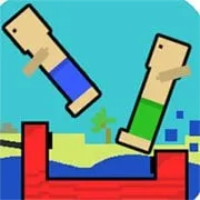
Bounce on inflatable tubes and knock opponents into the water in this chaotic local multiplayer party game. Last player standing wins — up to 4 players.
Attribution & hosting notice
- Developer:
- Not listed in our data
- Publisher:
- Not listed in our data
- Source:
- /embed/tube-jumpers/index.html
Pizza Edition hosts a free HTML5 browser build for convenience. We are not the official developer or publisher of this game. Rights remain with the original owners. Copyright / DMCA
Tags
Game Overview
Tube Jumpers is a local multiplayer party brawler where players bounce on inflatable tubes and try to knock everyone else into the water. Rounds are short, noisy, and intentionally chaotic — perfect for passing one keyboard or a set of controllers around a couch. The last person still dry wins the round; play a series to crown a session winner.
Pizza Edition hosts a Unity WebGL build. Because the control map lives inside the Unity content (not readable as plain HTML labels), this guide describes the rules and skills you can learn from play without inventing console button icons. When the game shows a controls card on boot or pause, that card wins over anything written here.
Use it as a palate cleanser between longer single-player games on the site. Party games earn their keep when the rules fit in one sentence and the stories write themselves. Tube Jumpers is that genre: nobody needs a wiki mid-match. The skill expression is spacing, jump timing, and emotional management when your roommate yeets you two seconds after spawn.
On a content-quality site page, that still deserves a real explanation: load expectations, fairness etiquette, and how to handle unknown Unity keymaps without inventing them.
How to Play
Start a match from the embed’s menu and select the number of players your build allows (commonly up to four for local sessions). Each fighter jumps/bounces on the shared tubes; landing on or colliding with others applies knockback toward the drink. Edge awareness matters as much as aggression — many self-eliminations are overzealous jumps.
If the build supports AI fillers, you can practice solo; otherwise grab friends for the intended experience. Between rounds, note who over-commits when the tubes stack high and who wins by poking from the center.
Because this is WebGL, give the loader a moment on first boot. After assets cache, rematches should start faster. House rules help: call out who sits on which keys/controllers before round one, play to a shared win count (first to five), and ban mid-round shove-of-the-laptop. If a player joins late, finish the current round before remapping seats. Spectators should not touch keyboards — most “mystery jumps” are elbow inputs.
WebGL performance tip: close other heavy tabs during four-player chaos so physics stay fair. If someone rubber-bands, it is often a performance issue, not cheating. Keep browser zoom at 100% if the Unity canvas crops input oddly.
Tips & Strategies
- 1Survive first: let two hot-heads collide, then contest the survivor.
- 2Own the center mass of the tubes; edges are where knockback becomes a swim.
- 3Short hops beat panic mash when the pile is unstable.
- 4Watch vertical stacks — landing from above often beats side shoulder-checks.
- 5If keyboard sharing is awkward, rotate players between rounds rather than overcrowding keys.
- 6Laugh resets: party games punish tilt more than mechanical skill gaps.
- 7When the on-screen control legend appears, screenshot/note it for your group; Unity maps differ by package.
- 8After you win a round, change nothing — copy the same timing next spawn.
- 9If someone is brand new, play a lighter “no edge-camping” house rule for two rounds.
Frequently Asked Questions
Q:How many players are supported?
A:Local party setups commonly allow 2–4 players. Check the embed menu for the exact cap.
Q:What are the exact keys?
A:They are defined inside the Unity build. Use the in-game controls/help screen rather than assuming WASD for everyone.
Q:Is there online matchmaking?
A:Expect local multiplayer (and possibly AI) rather than cross-internet ranked play unless the menu explicitly says otherwise.
Q:Can I play alone?
A:Only if the build includes bots or a training mode. The design center is couch competition.
Q:Why is the first load slow?
A:Unity WebGL fetches compiled assets once; keep the tab open to avoid re-downloading mid-session.
Q:Controllers?
A:Many Unity party games accept gamepads — try plugging one in if keyboard chaos is too high, and verify in the controls UI.
Q:Why is a player not jumping?
A:Wrong seat binding or an unfocused WebGL canvas. Click the game view, then re-check the controls card.
Q:Can I mod maps here?
A:Not through Pizza Edition. Play the packaged arenas only.